
Introduction
In today’s digital world, businesses and individuals rely heavily on online technology to store data, run applications, and manage daily operations. One of the most powerful technologies behind this shift is cloud computing. When people talk about the types of cloud computing, they are referring to different ways cloud services are designed, delivered, and used. Understanding these types of cloud computing is important because it helps you choose the right solution for your needs, whether you are a student, a startup owner, or part of a growing enterprise.
Cloud computing has changed how we use computers. Instead of buying expensive hardware or installing software on every device, users can access services through the internet. This approach saves time, reduces costs, and offers flexibility. However, not all cloud solutions work the same way. That is why learning about the types of cloud computing is essential before making any decision.
For beginners, cloud computing may sound complex at first. Yet, when explained simply, it becomes much easier to understand. Each type of cloud computing serves a specific purpose and fits different use cases. Some are best for small teams, while others are designed for large organizations with strict security needs.
In this detailed guide, you will explore the types of cloud computing step by step. You will learn what cloud computing is, why it matters, how it works, and what benefits and risks come with it. By the end, you will have a clear and practical understanding that you can confidently apply in real life.
What Is Cloud Computing?

Cloud computing is the delivery of computing services through the internet instead of using local computers or physical servers. These services include storage, databases, software, networking, and processing power. Users can access them anytime, from anywhere, using a connected device.
Instead of owning and maintaining hardware, users rent resources from cloud service providers. This model allows businesses to scale quickly and individuals to use powerful tools without technical complexity. Cloud computing works on a pay-as-you-go basis, which means you only pay for what you use.
When discussing the types of cloud computing, it is important to understand that cloud services are grouped based on how they are deployed and how they are delivered. Deployment models explain where the cloud is located and who controls it. Service models explain what kind of service is offered to users.
In simple words, cloud computing removes the burden of managing technology infrastructure. It allows users to focus on their goals while the cloud provider handles maintenance, updates, and security.
Why Is Cloud Computing Important?
Cloud computing is important because it supports modern digital life. Businesses depend on it to stay competitive, flexible, and efficient. Individuals use it daily, often without realizing it, when storing photos, sending emails, or streaming content.
One key reason cloud computing matters is cost efficiency. Companies no longer need to invest heavily in servers and IT staff. They can start small and grow as needed. This approach is especially helpful for startups and small businesses.
Another reason is accessibility. Cloud services can be accessed from anywhere with an internet connection. This supports remote work, online collaboration, and global operations. It also improves productivity and teamwork.
Security and reliability also make cloud computing valuable. Professional cloud providers use advanced security systems and regular backups. This reduces the risk of data loss and downtime.
Finally, innovation depends on the types of cloud computing available today. Developers can test ideas quickly, launch applications faster, and adapt to changing market needs. This flexibility drives growth across many industries.
Detailed Step-by-Step Guide to Types of Cloud Computing
Understanding the types of cloud computing becomes easier when broken into two main categories. These are deployment models and service models. Each category has its own subtypes that serve different needs.
Step 1: Cloud Deployment Models
Cloud deployment models describe how the cloud infrastructure is set up and who can access it.
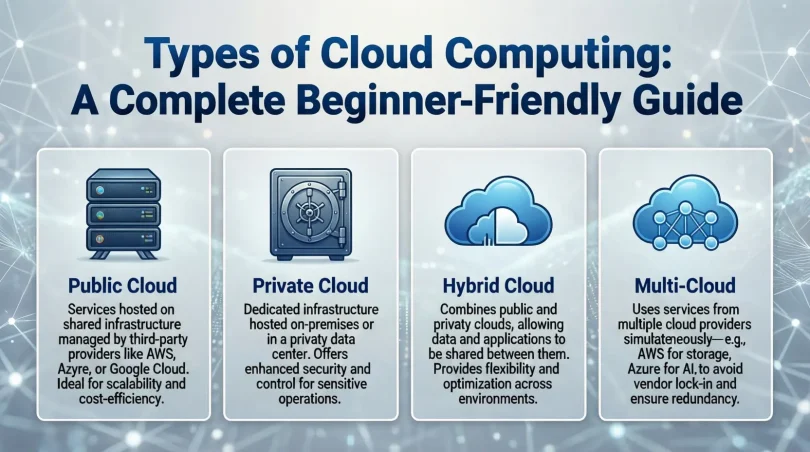
Public Cloud
A public cloud is owned and operated by a third-party provider. Services are shared among multiple users over the internet. This model is cost-effective and easy to use.
Public clouds are ideal for startups, developers, and small businesses. They offer high scalability and require no hardware management. Examples include online storage and email services.
However, since resources are shared, some organizations may have concerns about data privacy. Still, public cloud providers follow strict security standards.
Private Cloud
A private cloud is dedicated to a single organization. It can be hosted on-site or managed by a third party. This model offers greater control and security.
Private clouds are suitable for businesses handling sensitive data, such as financial or healthcare organizations. They allow customization based on specific needs.
The main drawback is higher cost. Private clouds require more investment in infrastructure and maintenance compared to public clouds.
Hybrid Cloud
A hybrid cloud combines public and private cloud environments. Data and applications can move between them as needed.
This model offers flexibility and balance. Businesses can keep sensitive data in a private cloud while using the public cloud for general tasks.
Hybrid clouds are popular among organizations that want security without sacrificing scalability. They also support gradual cloud adoption.
Community Cloud
A community cloud is shared by organizations with similar goals or requirements. These organizations may belong to the same industry or follow similar regulations.
Costs and resources are shared among participants. This makes community clouds more affordable than private clouds while offering better control than public clouds.
Community clouds are often used in education, government, and research sectors.
Step 2: Cloud Service Models
Cloud service models explain what type of service users receive from the cloud provider.
Infrastructure as a Service (IaaS)
IaaS provides basic computing resources such as servers, storage, and networking. Users have control over operating systems and applications.
This model is flexible and scalable. It is suitable for businesses that want full control without owning hardware.
IaaS is commonly used for website hosting, data storage, and testing environments.
Platform as a Service (PaaS)
PaaS offers a platform for developing, testing, and deploying applications. It includes tools, libraries, and frameworks.
Developers can focus on coding without worrying about infrastructure. This speeds up development and reduces complexity.
PaaS is ideal for application development teams and startups building software products.
Software as a Service (SaaS)
SaaS delivers software applications through the internet. Users access them through a browser without installation.
This is the most common type of cloud service. Examples include email platforms, online document editors, and customer management systems.
SaaS is easy to use, cost-effective, and requires minimal technical knowledge.
Benefits of Types of Cloud Computing
The types of cloud computing offer many advantages for different users. Some key benefits include:
- Lower costs due to reduced hardware and maintenance expenses
- Easy scalability to handle changing workloads
- Access from anywhere with an internet connection
- Faster deployment of applications and services
- Improved collaboration and productivity
- Automatic updates and maintenance
- Reliable data backup and recovery options
These benefits make cloud computing a practical choice for both individuals and organizations.
Disadvantages and Risks
Despite its advantages, cloud computing also has some risks. Understanding them helps in making informed decisions.
- Dependence on internet connectivity
- Potential data privacy concerns
- Limited control in public cloud environments
- Risk of service outages
- Ongoing subscription costs
- Compliance challenges for regulated industries
Careful planning and choosing the right type of cloud computing can reduce these risks.
Common Mistakes to Avoid
Many beginners make mistakes when choosing or using cloud services. Avoiding these errors saves time and money.
One common mistake is choosing the wrong deployment model. Not every business needs a private cloud. Overestimating requirements can increase costs.
Another mistake is ignoring security responsibilities. Even though providers offer security, users must manage access controls and data policies.
Some users also fail to plan for scalability. Choosing a service that cannot grow with your needs may cause problems later.
Finally, not understanding pricing models can lead to unexpected expenses. Always review usage and billing details carefully.
FAQs About Types of Cloud Computing
What are the main types of cloud computing?
The main types of cloud computing include public, private, hybrid, and community clouds. These are deployment models that define how cloud resources are managed and shared.
Which type of cloud computing is best for beginners?
For beginners, the public cloud is usually the best choice. It is affordable, easy to use, and requires minimal technical knowledge.
Is cloud computing secure?
Cloud computing is generally secure when used correctly. Providers use advanced security measures, but users must also follow best practices.
Can small businesses benefit from cloud computing?
Yes, small businesses benefit greatly from cloud computing. It reduces costs, supports growth, and improves efficiency.
What is the difference between IaaS, PaaS, and SaaS?
IaaS offers infrastructure, PaaS offers development platforms, and SaaS delivers ready-to-use software. Each serves different needs.
Do I need technical skills to use cloud services?
Basic cloud services like SaaS require little to no technical skills. Advanced models like IaaS may need technical knowledge.
Expert Tips and Bonus Points
When exploring the types of cloud computing, always start with your goals. Understand what you want to achieve before selecting a model.
Test services using free trials. This helps you learn without financial risk.
Focus on security from the beginning. Use strong passwords, access controls, and data backups.
Monitor usage regularly to avoid unexpected costs. Cloud platforms offer tools to track performance and spending.
Finally, keep learning. Cloud technology evolves quickly, and staying updated helps you make better decisions.
Conclusion
The types of cloud computing play a crucial role in modern technology. From individuals storing personal files to large organizations managing complex systems, cloud solutions support a wide range of needs. By understanding the different deployment and service models, users can choose the most suitable option with confidence.
Cloud computing offers flexibility, cost savings, and accessibility that traditional systems cannot match. Public clouds provide ease and affordability, private clouds offer control and security, and hybrid clouds deliver the best of both worlds. Service models like IaaS, PaaS, and SaaS further expand the possibilities by catering to different technical requirements.
While there are risks involved, careful planning and informed choices can minimize challenges. Avoiding common mistakes and following expert tips makes the cloud journey smoother and more effective.
As technology continues to evolve, cloud computing will remain a key foundation for innovation. Learning about the types of cloud computing today prepares you for future opportunities. Whether you are a beginner or an intermediate learner, this knowledge empowers you to use cloud services wisely and efficiently.