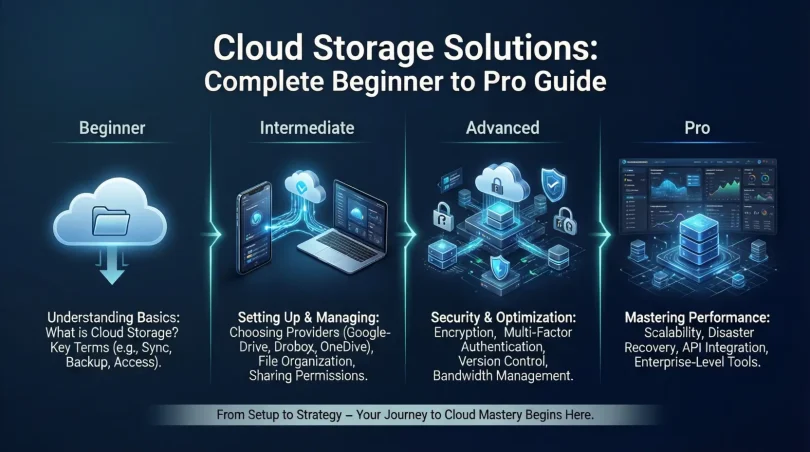

Introduction
Cloud storage solutions have changed the way people store, manage, and access data. In the past, files were saved on physical devices like hard drives, USBs, or local servers. These methods often caused problems such as data loss, limited storage space, and difficulty accessing files from different locations. Today, cloud storage solutions offer a modern and flexible way to store data securely on the internet.
Cloud storage solutions allow users to upload files to remote servers that can be accessed anytime using an internet connection. This approach is useful for individuals, small businesses, and large organizations alike. From saving photos and videos to managing important business documents, cloud storage solutions support many daily needs. They also help teams collaborate by allowing multiple users to access and edit files in real time.
Another reason cloud storage solutions are becoming popular is cost efficiency. Instead of buying expensive hardware, users can pay for only the storage they need. Many providers even offer free plans for basic usage. Security has also improved, with features like encryption, backups, and access controls making data safer than ever.
In this article, you will learn everything about cloud storage solutions in simple and easy language. We will explain what cloud storage solutions are, why they are important, how to use them step by step, their benefits, risks, common mistakes, expert tips, and frequently asked questions. By the end, you will have a clear understanding of cloud storage solutions and how to use them wisely.
What is Cloud Storage Solutions?
Cloud storage solutions are online services that store data on remote servers instead of local devices. These servers are maintained by cloud service providers and can be accessed through the internet. Users can upload, download, edit, and share files from anywhere using computers, tablets, or smartphones.
Unlike traditional storage methods, cloud storage solutions do not depend on physical location. Files remain available even if your device is damaged or lost. The provider manages hardware, maintenance, and updates, so users can focus on their work without technical stress.
Cloud storage solutions come in different types. Public cloud storage is shared among multiple users, while private cloud storage is dedicated to one organization. Hybrid cloud storage combines both options, offering flexibility and control.
In simple words, cloud storage solutions act like a digital locker that is always available online. You store your data once and access it whenever needed without carrying physical storage devices.
Why is Cloud Storage Solutions Important?
Cloud storage solutions are important because they solve many problems linked to traditional data storage. One major reason is accessibility. Users can access files from anywhere, which supports remote work and online collaboration.
Another important factor is data safety. Cloud storage solutions often include automatic backups, reducing the risk of losing important data. Even if a device crashes, files remain safe on the cloud.
Scalability also makes cloud storage solutions valuable. Users can easily increase or decrease storage based on their needs. This flexibility is especially useful for growing businesses.
Cost savings are another key benefit. There is no need to buy expensive hardware or worry about maintenance. Cloud storage solutions usually operate on a subscription model, making budgeting easier.
Finally, cloud storage solutions improve productivity. Teams can share files instantly, track changes, and work together efficiently without delays.
Detailed Step-by-Step Guide
Step 1: Understand Your Storage Needs
Before choosing cloud storage solutions, identify what type of data you want to store. Consider file size, data sensitivity, and access frequency. Personal users may need space for photos and documents, while businesses may require secure storage for client data.
Step 2: Choose the Right Type of Cloud Storage
There are three main types of cloud storage solutions:
- Public cloud storage for general use
- Private cloud storage for high security
- Hybrid cloud storage for flexibility
Choose based on your privacy and performance needs.
Step 3: Select a Reliable Provider
Look for a provider with strong security features, good customer support, and reliable uptime. Pricing plans should match your budget and storage requirements.
Step 4: Create an Account and Set Permissions
After signing up, create user accounts if needed. Set permissions to control who can view, edit, or share files. This step is important for data security.
Step 5: Upload and Organize Files
Upload files and organize them into folders. Clear naming and folder structure help manage data efficiently. Some cloud storage solutions also offer tagging features.
Step 6: Enable Backup and Sync Options
Activate automatic backups and syncing. This ensures your files stay updated across all devices and reduces the risk of data loss.
Step 7: Monitor and Optimize Usage
Regularly check storage usage and remove unnecessary files. This helps control costs and improves performance.
Benefits of Cloud Storage Solutions

- Easy access to data from anywhere
- Automatic backups and data recovery
- Cost-effective storage options
- Scalable storage capacity
- Improved collaboration and sharing
- Reduced hardware maintenance
- Better data security features
Disadvantages / Risks
- Dependence on internet connection
- Potential data privacy concerns
- Subscription costs over time
- Limited control over server location
- Risk of service outages
Common Mistakes to Avoid
Many users make mistakes when using cloud storage solutions. One common error is ignoring security settings. Weak passwords and open access permissions can expose data to risks.
Another mistake is not organizing files properly. Poor file management leads to confusion and wasted time. Users should also avoid relying on one provider without backups.
Some people choose plans without checking storage limits. This can cause unexpected costs. Finally, failing to review provider policies may result in compliance issues.
FAQs
What are cloud storage solutions used for?
Cloud storage solutions are used to store files online and access them from anywhere. They support data backup, file sharing, and collaboration.
Are cloud storage solutions safe?
Most cloud storage solutions use encryption and security protocols. However, users must also follow best practices like strong passwords.
Can cloud storage solutions replace hard drives?
Cloud storage solutions can reduce dependence on hard drives, but many users prefer using both for extra safety.
Do cloud storage solutions work offline?
Some services allow offline access, but full functionality usually requires an internet connection.
How much storage do I need?
Storage needs depend on file type and usage. Personal users may need less space, while businesses require larger plans.
Are free cloud storage solutions reliable?
Free plans are useful for basic needs but often have limited space and features.
Expert Tips & Bonus Points
Experts recommend using two-factor authentication for better security. Regularly review access permissions and remove unused accounts. Encrypt sensitive files before uploading for extra protection.
Another useful tip is to categorize data based on importance. Keep critical files in high-security folders. Schedule regular audits to manage storage efficiently.
For businesses, combining cloud storage solutions with local backups ensures maximum data safety. Training team members on proper usage also improves overall security.
Conclusion
Cloud storage solutions have become an essential part of modern digital life. They provide a simple, secure, and flexible way to store and manage data without relying on physical devices. From personal use to business operations, cloud storage solutions support productivity, collaboration, and data protection.
By understanding how cloud storage solutions work and following best practices, users can enjoy their benefits while minimizing risks. Choosing the right provider, setting strong security measures, and organizing data properly are key steps to success.
As technology continues to grow, cloud storage solutions will become even more advanced and reliable. Learning how to use them today prepares you for a smarter and more efficient digital future. Whether you are a beginner or an intermediate user, cloud storage solutions offer practical value that cannot be ignored.