
Introduction
In today’s digital world, businesses and individuals depend heavily on technology to store data, run applications, and connect with users. One major reason this has become easier and more affordable is the cloud computing service. Instead of buying expensive hardware or managing complex systems, people can now access powerful computing resources through the internet. This shift has changed how companies operate, how startups grow, and how individuals use software in daily life.
A cloud computing service allows users to use servers, storage, databases, networking, and software without owning physical infrastructure. Everything is available on demand, which means you pay only for what you use. This flexibility has made technology more accessible than ever before. Small businesses can now compete with larger companies because they can scale their resources easily.
For beginners, the idea of the cloud may sound confusing at first. However, it is simply about using remote computers instead of your own. For intermediate users, understanding how cloud services work can help improve performance, reduce costs, and increase security. As more organizations move online, cloud-based solutions continue to grow in importance.
In this detailed guide, you will learn what cloud computing is, why it matters, how to use it step by step, and what benefits and risks you should know about. By the end, you will have a clear and practical understanding that you can apply confidently.
What is Cloud Computing Service?
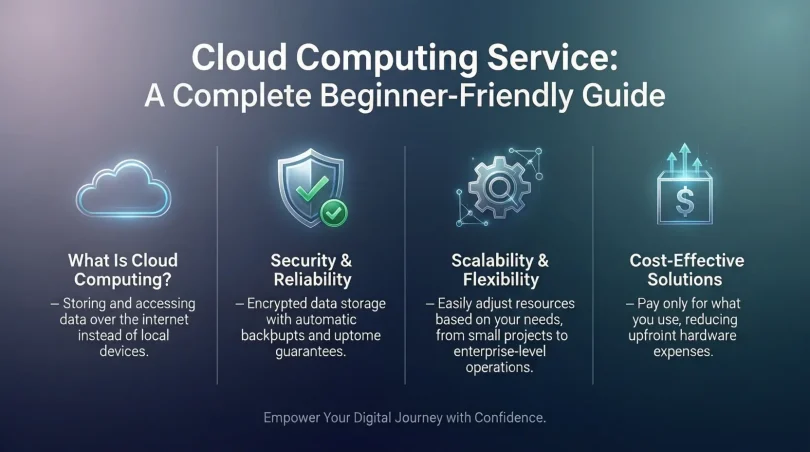
A cloud computing service is a technology model where computing resources are delivered over the internet. These resources include storage, processing power, databases, and software applications. Instead of installing programs or storing files on a local computer, users access everything online.
The main idea behind cloud computing is convenience. You can log in from anywhere, on any device, and access the same data and tools. This is possible because the actual work happens on remote servers maintained by service providers. These providers manage hardware, updates, and security, allowing users to focus on their tasks.
Cloud services are usually offered in three main forms. Infrastructure services provide basic computing resources like virtual machines and storage. Platform services offer tools for developers to build applications. Software services deliver ready-to-use applications through a browser. Together, these options cover almost every digital need.
In simple terms, cloud computing replaces traditional computing methods with a more flexible and efficient approach. It removes the need for heavy upfront investment and makes advanced technology available to everyone.
Why is Cloud Computing Service Important?

The importance of cloud computing lies in how it simplifies technology usage. Traditional systems require constant maintenance, upgrades, and physical space. Cloud solutions remove these burdens and provide instant access to modern tools.
One major reason cloud services are important is scalability. Businesses can increase or decrease resources as needed. This means no wasted money on unused hardware. Another key factor is reliability. Cloud providers use multiple servers and backups, reducing the risk of data loss.
Security is also a strong reason for adoption. Professional providers invest heavily in protecting data. They use encryption, monitoring, and regular updates. For many users, this level of protection is difficult to achieve alone.
Finally, cloud computing supports innovation. Developers can test ideas quickly without long setup times. Teams can collaborate easily, even from different locations. Overall, cloud technology helps organizations stay competitive in a fast-changing digital environment.
Detailed Step-by-Step Guide
Step 1: Identify Your Needs
Before choosing a cloud solution, clearly define your goals. Decide whether you need storage, application hosting, data analysis, or full infrastructure. Understanding your needs helps you select the right type of service.
Step 2: Choose the Right Service Model
There are three main models to consider. Infrastructure services are suitable for advanced users who want control. Platform services are ideal for developers building applications. Software services work best for users who want ready-made tools.
Step 3: Select a Deployment Type
Cloud systems can be public, private, or hybrid. Public options are shared and cost-effective. Private ones offer more control and security. Hybrid models combine both approaches.
Step 4: Create an Account and Set Permissions
Once you select a provider, create an account and define user roles. Proper access control ensures that only authorized people can view or modify data.
Step 5: Migrate Data and Applications
Move your existing files and applications to the cloud. This process may involve uploading data, configuring settings, and testing performance to ensure everything works smoothly.
Step 6: Monitor and Optimize Usage
After deployment, regularly monitor usage and costs. Adjust resources as needed to maintain efficiency and avoid unnecessary expenses.
Benefits of Cloud Computing Service
- Lower upfront costs compared to traditional systems
- Easy scalability based on demand
- Access from anywhere with internet
- Automatic updates and maintenance
- Improved collaboration for teams
- High reliability and data backup
- Enhanced security features
- Faster deployment of applications
Disadvantages / Risks
- Dependence on internet connectivity
- Potential downtime from provider issues
- Limited control in shared environments
- Data privacy concerns if mismanaged
- Ongoing subscription costs
- Vendor lock-in challenges
Common Mistakes to Avoid
Many beginners make the mistake of choosing services without understanding their needs. This often leads to higher costs or poor performance. Another common error is ignoring security settings. Even though providers offer protection, users must configure access properly.
Some organizations fail to monitor usage, resulting in unexpected bills. Others rush migration without testing, causing disruptions. Avoiding these mistakes requires planning, training, and regular reviews of your cloud setup.
FAQs
What is the main purpose of cloud computing?
The main purpose is to provide computing resources on demand without requiring physical hardware ownership. This makes technology more flexible and affordable.
Is cloud computing safe for personal data?
Yes, when configured correctly. Providers use strong security measures, but users should also follow best practices like strong passwords and access control.
Can small businesses benefit from cloud services?
Absolutely. Cloud solutions help small businesses reduce costs, scale easily, and access professional tools previously available only to large companies.
Do I need technical skills to use cloud services?
Basic services are user-friendly and require minimal skills. Advanced configurations may need technical knowledge or professional support.
How does cloud pricing work?
Most services use a pay-as-you-go model. You are charged based on usage, such as storage space or processing time.
What happens if I want to change providers?
Switching is possible but may require data migration and compatibility checks. Planning ahead can reduce difficulties.
Expert Tips & Bonus Points
Start small and expand gradually. This reduces risk and helps you understand costs. Regularly review security settings and user permissions. Train your team to use cloud tools effectively. Keep backups even if the provider offers them. Finally, stay informed about new features and updates to get the most value.
Conclusion
Cloud technology has transformed how digital services are delivered and used. By offering flexibility, scalability, and cost efficiency, it has become an essential part of modern computing. A cloud computing service allows individuals and businesses to focus on growth instead of infrastructure management.
For beginners, understanding the basics opens the door to powerful tools. For intermediate users, deeper knowledge leads to better optimization and innovation. While there are risks, careful planning and responsible usage can minimize them effectively.
As technology continues to evolve, cloud solutions will remain at the center of digital progress. Learning how to use them today prepares you for future opportunities. With the right approach, cloud computing can become a reliable foundation for success in a connected world.