
Introduction
The internet has become an essential part of daily life. From social media and online banking to remote work and education, we rely on the digital world more than ever. While it offers countless opportunities, it also comes with risks that many people overlook. Hackers, scammers, identity theft, and cyberbullying are just a few examples of dangers that can affect anyone. Without proper knowledge, users can unknowingly expose their personal information, leading to financial loss or emotional stress.
Internet safety is not just for adults; children and teenagers are especially vulnerable. Schools, parents, and individuals must understand the importance of online security. Practicing safe internet habits can prevent unwanted incidents and provide peace of mind. By taking simple precautions, you can enjoy the benefits of the internet without worrying about potential threats.
In this comprehensive internet safety guide, we will cover everything from the basics of online protection to advanced techniques. You will learn practical tips, step-by-step guides, and expert advice to safeguard yourself and your family. Whether you are a beginner or someone familiar with online security, this guide will help you navigate the digital world confidently. By following these strategies, you can ensure a safer online experience and avoid common pitfalls that compromise security.
What is Internet Safety?
Internet safety refers to the practice of protecting yourself, your personal information, and your digital devices while using the internet. It involves understanding potential threats, recognizing risky behaviors, and implementing strategies to reduce the chance of harm.
Key components of internet safety include:
- Protecting Personal Information: Ensuring sensitive data like passwords, credit card details, and home addresses are secure.
- Safe Online Behavior: Avoiding interactions with unknown individuals or suspicious websites.
- Device Security: Using antivirus software, firewalls, and regular updates to protect devices from malware.
- Privacy Settings: Adjusting social media, email, and app settings to limit data exposure.
In simple terms, internet safety is about staying aware of potential dangers and taking steps to prevent them. It’s not just a set of rules but a mindset for safe online engagement. Practicing good internet safety habits can save time, money, and stress in the long run.
Why is Internet Safety Important?
Internet safety is critical because the online world is full of potential risks that can have real-life consequences. The importance of online safety includes:
- Protection from Cybercrime: Hackers can steal personal information, leading to identity theft or financial loss.
- Preventing Malware Attacks: Unsafe websites and downloads can infect devices with viruses, spyware, or ransomware.
- Avoiding Scams and Fraud: Phishing emails, fake websites, and online scams can trick users into sharing sensitive information.
- Child Safety: Children and teens are vulnerable to online predators, cyberbullying, and inappropriate content.
- Data Privacy: Personal information shared online can be misused for targeted ads, scams, or even illegal activities.
Ignoring internet safety can have serious consequences. Many people assume cyber attacks only happen to big companies, but individuals are equally at risk. By understanding and practicing online safety, you reduce the chance of becoming a victim.
Detailed Step-by-Step Internet Safety Guide
Step 1: Use Strong Passwords
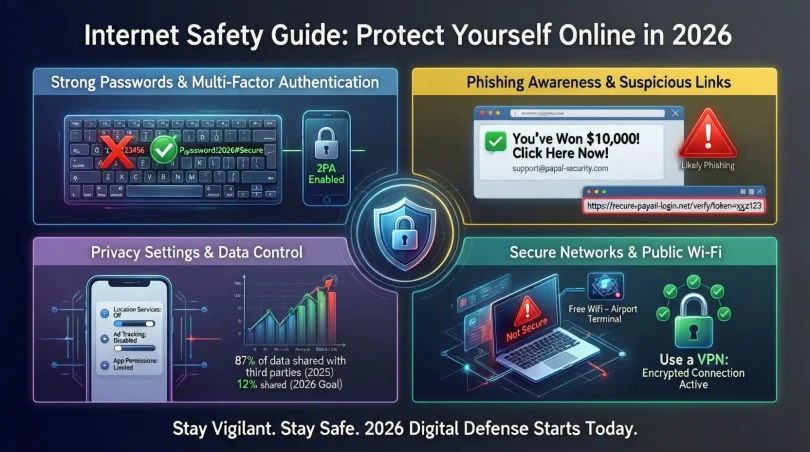
- Avoid common passwords like “123456” or “password.”
- Use a mix of letters, numbers, and symbols.
- Change passwords regularly and never reuse them across multiple accounts.
- Consider using a password manager to store and generate secure passwords.
Step 2: Enable Two-Factor Authentication (2FA)
- Adds an extra layer of security by requiring a code sent to your phone or email.
- Use 2FA for email, social media, and financial accounts.
Step 3: Keep Software Updated
- Regularly update your operating system, browsers, and apps.
- Updates fix vulnerabilities that hackers exploit.
Step 4: Protect Your Devices
- Install trusted antivirus and anti-malware software.
- Use firewalls to prevent unauthorized access.
- Avoid using public Wi-Fi for sensitive transactions; use a VPN if necessary.
Step 5: Be Cautious with Emails and Links
- Do not click unknown links or attachments.
- Verify the sender before sharing personal information.
- Look for signs of phishing, such as poor grammar or urgent requests.
Step 6: Limit Personal Information Sharing
- Avoid sharing your address, phone number, or financial details online.
- Use privacy settings on social media to control who sees your posts.
- Be mindful of location-sharing features on apps and devices.
Step 7: Monitor Your Accounts Regularly
- Check bank statements and online accounts for unusual activity.
- Set up alerts for transactions and login attempts.
Step 8: Educate Yourself and Family
- Teach children about online dangers and responsible internet use.
- Encourage family members to follow safety practices and report suspicious activities.
Step 9: Secure Online Transactions
- Use secure websites (look for “https” and a lock icon).
- Avoid saving payment details on multiple sites.
- Prefer credit cards over debit cards for online purchases as they often offer better fraud protection.
Step 10: Backup Important Data
- Regularly back up files to a secure cloud service or external storage.
- In case of malware or device failure, backups ensure you do not lose important information.
Benefits of Internet Safety
- Protection from Cybercrime: Reduces the risk of identity theft and fraud.
- Enhanced Privacy: Keeps personal information secure from hackers and marketers.
- Peace of Mind: Users can browse, shop, and communicate safely.
- Child Safety: Protects children from online predators and inappropriate content.
- Device Security: Prevents malware infections and system failures.
- Financial Security: Safe online banking reduces the risk of financial loss.
Disadvantages / Risks of Ignoring Internet Safety
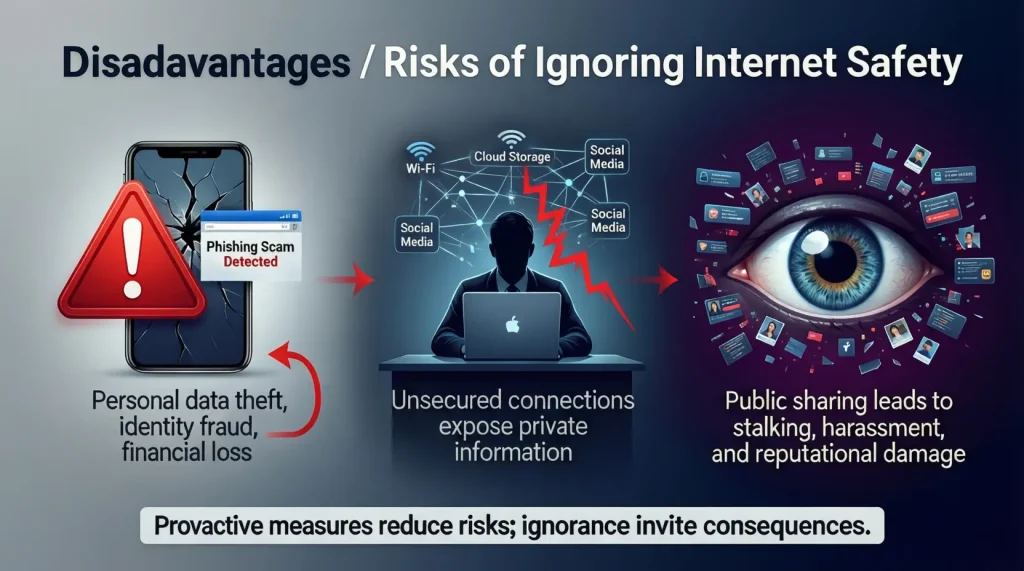
- Identity Theft: Hackers can steal personal information and misuse it.
- Financial Loss: Unauthorized access to bank accounts or credit cards.
- Malware Attacks: Viruses, ransomware, and spyware can damage devices.
- Data Loss: Loss of important files due to cyberattacks.
- Cyberbullying: Emotional and psychological effects, especially on teenagers.
- Reputation Damage: Inappropriate posts or leaked information can harm personal or professional reputation.
Common Mistakes to Avoid
- Using weak or repeated passwords across multiple accounts.
- Clicking unknown links or downloading unverified files.
- Sharing too much personal information online.
- Ignoring software updates or antivirus protection.
- Using public Wi-Fi for banking or sensitive activities.
- Failing to educate children about online dangers.
- Believing that only big companies or hackers target individuals.
By avoiding these mistakes, you significantly improve your online security and protect your personal and financial information.
FAQs About Internet Safety
1. What is the most important step in internet safety?
Using strong, unique passwords and enabling two-factor authentication are among the most effective steps. They make it harder for hackers to access your accounts.
2. Can I be completely safe online?
While no method guarantees 100% safety, following best practices, such as updating software, using antivirus, and practicing caution, greatly reduces risks.
3. How can I protect my children online?
Use parental controls, monitor online activity, teach responsible internet use, and discuss dangers like cyberbullying and online predators.
4. Is public Wi-Fi safe for online banking?
Public Wi-Fi is risky for sensitive transactions. Use a VPN or mobile data when accessing bank accounts or making payments online.
5. What should I do if I fall victim to a cyber attack?
Immediately change passwords, notify your bank if financial accounts are involved, and report the incident to relevant authorities or platforms.
6. How often should I update my passwords?
Ideally, change passwords every 3–6 months, especially for financial accounts, and avoid using the same password across multiple accounts.
7. Can antivirus software prevent all online threats?
Antivirus software is essential but not foolproof. Combining antivirus with safe browsing habits and regular updates provides better protection.
8. How do I recognize a phishing attempt?
Phishing emails often include urgent messages, spelling mistakes, unknown senders, or suspicious links. Always verify the sender before clicking.
Expert Tips & Bonus Points
- Use Password Managers: Tools like LastPass or 1Password generate and store secure passwords.
- Regularly Audit Privacy Settings: Recheck social media and app permissions to ensure you are not oversharing.
- Enable Alerts: Turn on notifications for login attempts and transactions to detect unauthorized activity quickly.
- Educate Yourself Continuously: Stay updated on new cyber threats and scams.
- Use Encrypted Communication: For sensitive conversations, use apps that offer end-to-end encryption.
- Limit Cookies and Trackers: Adjust browser settings to reduce tracking by third-party websites.
- Log Out After Use: Especially on public or shared devices, always log out from accounts.
- Be Skeptical: Question emails, messages, or offers that seem too good to be true.
These expert tips ensure that you not only protect yourself but also create a safer online environment for your family and friends.
Conclusion
Internet safety is no longer optional—it is essential. The digital world offers countless benefits, but without caution, users risk financial loss, identity theft, and emotional stress. By understanding potential threats and implementing practical safety measures, you can navigate the internet confidently. Strong passwords, two-factor authentication, device security, and cautious online behavior are the foundation of a safe online presence.
Educating yourself and your family, monitoring accounts, and backing up important data further enhance security. By practicing these habits, you reduce risks while enjoying the full advantages of the digital world. Internet safety is about awareness, prevention, and responsible online behavior.
In today’s connected era, a safe online experience requires vigilance and proactive measures. Following the strategies outlined in this guide ensures that you, your family, and your data remain secure. By making internet safety a priority, you protect not just your personal information but also your peace of mind, allowing you to explore the digital world with confidence and security.